Function Declaration vs. Function Expression
If you’re learning to code, you’ve likely realized that you don't want to type the same instructions over and over again. That’s where functions come in! But in JavaScript, there’s more than one way to build one.
Let’s break down the two most common ways: Function Declarations and Function Expressions.
What are functions and why do we need them?
Imagine you're baking a cake. You follow the same steps every time: mix flour, add eggs, bake at 180°C. Now, what if you had to write those steps out every single time you wanted a cake? That would be exhausting.
In programming, a function is your recipe — a reusable block of code that you write once and can run as many times as you need.
💡Simple definition
A function is a named block of code that performs a specific task. You define it once, then call it whenever you need it.
Here's the simplest possible example — adding two numbers:
// Without a function — repetitive!
let result1 = 3 + 5;   // 8
let result2 = 7 + 2;   // 9
let result3 = 10 + 4;  // 14

// With a function — clean and reusable!
function add(a, b) {
  return a + b;
}

add(3, 5);   // 8
add(7, 2);   // 9
add(10, 4);  // 14
Now you know why functions exist. But JavaScript gives you two different ways to write them — and that's what this article is all about.
Function Declaration — the classic way
A function declaration is the most traditional way to create a function. It starts with the keyword function, followed by a name, and then the code block.
// ↓ This is a function declaration
function greet(name) {
  return "Hello, " + name + "!";
}

// Calling the function:
console.log(greet("Alice"));  // Hello, Alice!
console.log(greet("Bob"));    // Hello, Bob!
Breaking it down
The anatomy of a function declaration is simple:
📐
Anatomy of a Function Declaration
functionkeyword → name (greet) → parameters in parentheses (name) → code inside curly braces{ }
Think of it like declaring a recipe and giving it a title. Once declared, you can call it by name from anywhere in your code.
Function Expression — functions as values
A function expression creates a function and assigns it to a variable — just like you'd store a number or a string in a variable.
// ↓ This is a function expression
const greet = function(name) {
  return "Hello, " + name + "!";
};  // ← notice the semicolon!

// Calling it works the same way:
console.log(greet("Alice"));  // Hello, Alice!
🔍Spot the difference
The function itself has no name after the
functionkeyword. Instead, the variable (greet) gives it an identity. The function is an anonymous value stored inside a variable.
Arrow function expressions
You'll often see a shorter version called an arrow function. It's just a more compact way to write a function expression:
// Regular function expression:
const double = function(n) {
  return n * 2;
};

// Same thing as an arrow function — shorter!
const double = (n) => n * 2;

console.log(double(5));  // 10
Arrow functions behave like function expressions, both are stored in variables and follow the same rules.
How to call a function
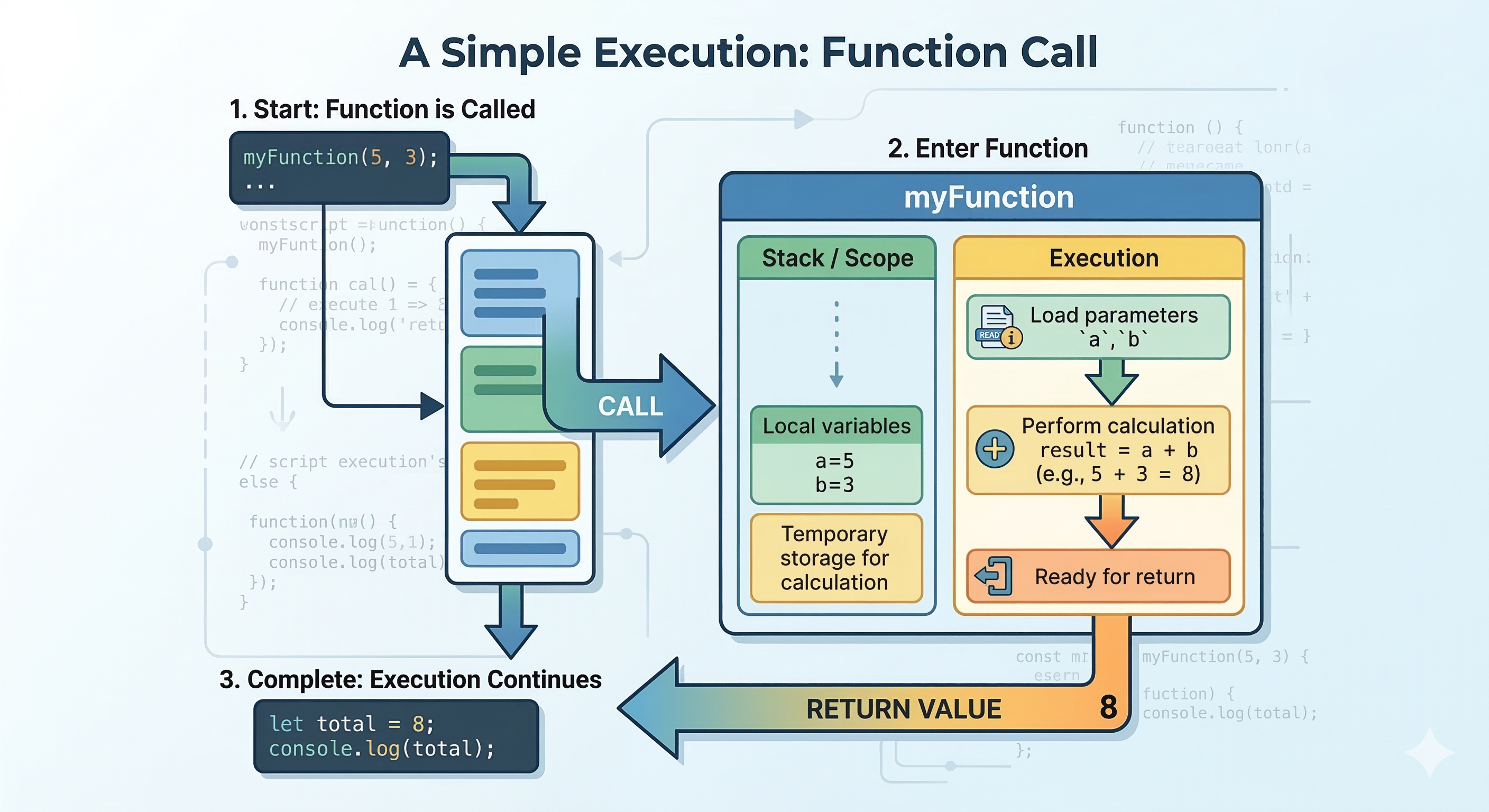
Writing a function doesn't run it. You have to call (also said: invoke) it — that's what triggers the code inside to actually execute. Think of it like writing a recipe vs. actually cooking it.
Calling a function is simple: write its name followed by parentheses (). Whatever goes inside the parentheses are the arguments — the real values you're passing in.
Basic function call — no arguments
function sayHello() {
  console.log("Hello, World!");
}

// ↓ This is the function call
sayHello();  // Hello, World!

// You can call it as many times as you want
sayHello();  // Hello, World!
sayHello();  // Hello, World!
Calling with arguments
When a function has parameters (placeholders in the definition), you pass real values when calling it. Those real values are called arguments.
// "a" and "b" are parameters (placeholders)
function add(a, b) {
  return a + b;
}

// 3 and 5 are arguments (real values)
add(3, 5);    // 8  → a=3, b=5
add(10, 20);  // 30 → a=10, b=20
add(0, 7);   // 7  → a=0, b=7
🔑Parameter vs Argument — what's the difference?
Aparameteris the variable name in the function definition (
a,b).Anargumentis the actual value you pass when calling it (
3,5). Same slot, different stage.
Key differences side by side
Let's look at both writing the exact same logic — adding two numbers — and compare them directly:
// Function Declaration
function add(a, b) {
  return a + b;
}

add(2, 3); // 5

// Function Expression

const add = function(a, b) {
  return a + b;
};

add(2, 3); // 5
The output is identical — 5 either way. The differences are in how they're structured and how JavaScript treats them internally.
| Feature | Function Declaration | Function Expression |
|---|---|---|
| Syntax starts with | function name() |
const name = function() |
| Ends with semicolon? | No | Yes |
| Has a function name | Yes | Usually anonymous |
| Can call before defining? | Yes (hoisted) | No (not hoisted) |
| Stored in a variable | No | Yes |
| Best for | Reusable, named utilities | Callbacks, closures, assignment |
Hoisting — what runs before what?
Here's where the most important practical difference lives. JavaScript has a behaviour called hoisting: before your code runs, the engine scans through and "lifts" certain things to the top.
Function declarations are hoisted. Function expressions are not.
What does that mean in plain English? You can call a function declaration before you write it in your code, and it still works. With a function expression, you must define it first.
// ✅ This WORKS — declaration is hoisted
console.log(sayHi());   // "Hi there!"

function sayHi() {
  return "Hi there!";
}

// ❌ This FAILS — expression is NOT hoisted
console.log(sayBye());   // Error: Cannot access before initialization

const sayBye = function() {
  return "Goodbye!";
};

//sayHi() ← before declaration → ✅ Works fine

//function sayHi() { ... } → Hoisted to top

//sayBye() ← before expression  → ❌ Error!

//const sayBye = function() { ... }  →  Not hoisted
⚠️ Quick mental model
Think of hoisting this way: JavaScript reads your file twice. The first time, it picks up all function declarations. The second time, it runs the code line by line. Expressions only exist during the second pass — so calling them early always fails.
"Declarations are hoisted to the top of the file. Expressions only exist after the line they're written on is executed."
"Declarations are hoisted to the top of the file. Expressions only exist after the line they're written on is executed."
When to use each type
Neither style is universally "better" — they're tools for different situations. Here's a practical guide:
Use a Declaration when...
You're writing a reusable utility function (like
calculateTax())You want flexibility to call the function anywhere in your file
You're working on the top level of a module or script
The function is a core, named piece of logic
Use an Expression when...
You're passing a function as an argument (like a callback)
You want to conditionally assign different functions
You're working with event listeners or timers
You want to be explicit that the function shouldn't be called early
Here's a real-world scenario showing both used together:
// Declaration — named utility, used throughout the code
function multiply(a, b) {
  return a * b;
}

// Expression — used as a callback for array mapping
const numbers = [1, 2, 3, 4];
const doubled = numbers.map(function(n) {
  return multiply(n, 2);
});

console.log(doubled);  // [2, 4, 6, 8]
✅ A good default rule for beginners
Start with function declarations for named logic. Use function expressions (especially arrow functions) when you need to pass a function to another function, like with
.map(),.filter(), or event handlers.
Practice assignment
Multiply two numbers — two ways
Write a function declaration called
multiplythat takes two numbers and returns their product.Write the same logic as a function expression, stored in a variable called
multiplyExpr.Call both functions with
(4, 5)and log the results. Both should print20.Bonus: Try calling each function before you define it. What happens? Which one gives an error? Why?
// Step 1: Write a function declaration
function multiply(a, b) {
  // your code here
}

// Step 2: Write a function expression
const multiplyExpr = function(a, b) {
  // your code here
};

// Step 3: Call them and check the results
console.log(multiply(4, 5));      // Expected: 20
console.log(multiplyExpr(4, 5));  // Expected: 20
Quick recap
You've now learned the two main ways to write functions in JavaScript. Here's the one-paragraph version to keep in your pocket:
A function declaration uses the
functionkeyword and a name, and can be called anywhere in your file because it's hoisted. A function expression stores a function in a variable, must be defined before it's called, and is ideal for callbacks and flexible assignments.
As you write more JavaScript, you'll develop an instinct for which to reach for. For now, just know they're both valid, both useful, and the only real gotcha is hoisting — declarations float, expressions don't.
Happy coding! 🚀
Comments
Join the discussionNo comments yet. Be the first to comment.